Affiliate Disclosure: This article contains affiliate links. If you purchase through our links, we may earn a small commission at no extra cost to you. This helps us keep testing watches and producing honest reviews. We only recommend products we've actually used with our own kids. Read our full disclosure
You Don't Need to Spend $200 on a Kids Smartwatch
I'm going to be straight with you: when I first started researching kids smartwatches, I nearly choked on my coffee. Two hundred dollars for a watch a 7-year-old would inevitably bang against a playground slide? Three hundred for something he might lose at soccer practice? No thanks.
Here's what I've learned after testing over a dozen watches with three test kids over the past two years: you can get legitimate GPS tracking, calling, and SOS features for under $100. You'll make some trade-offs, and I'll be completely transparent about what those are. But for most families, especially those buying their first kids smartwatch or outfitting multiple children, the budget tier delivers genuine value.
The watches on this list range from $50 to $100 at the device level. Some require monthly plans (I'll break down every dollar below), and one doesn't even have GPS, which is actually fine for certain use cases. If you want to see what more money buys you, our 7 best GPS smartwatches for kids covers the full price range. I've tested each of these with at least one of my kids for a minimum of two weeks, and I tracked battery life, GPS accuracy, app responsiveness, and durability in real-world conditions.
Let's find the right budget watch for your family.
Quick Comparison: All 5 Budget Picks at a Glance
Before we dive into individual reviews, here's how these five watches stack up on the specs that matter most.
| Watch |
Price |
GPS |
Calling |
Battery Life |
Water Resistance |
Monthly Cost |
| Cosmo JrTrack 2 |
~$100 |
Yes (4G LTE) |
Yes |
1-2 days |
IP67 |
~$10/mo |
| Gabb Watch 3 |
~$100 |
Yes (4G LTE) |
Yes |
1-2 days |
IP68 |
~$10/mo |
| SyncUP Kids Watch |
~$70 |
Yes (4G LTE) |
Yes |
1-2 days |
IPX7 |
~$10/mo (T-Mobile) |
| Xplora XGO3 |
~$80 |
Yes (4G LTE) |
Yes |
2-3 days |
IPX4 |
~$8-10/mo |
| iTouch PlayZoom |
~$50 |
No |
No |
3-5 days |
Splash-proof |
$0 |
The takeaway: Four of these five watches offer real GPS and cellular calling under $100. The iTouch PlayZoom is a different animal entirely, and I'll explain exactly who it's for.
Individual Reviews
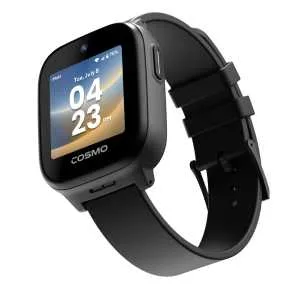
1. Cosmo JrTrack 2 (~$100) - Best Overall Budget Pick
Check Price on Amazon
The Cosmo JrTrack 2 is the watch I recommend most often to parents who ask me, "What's the cheapest watch that actually works?" It punches well above its price point, delivering a 4G LTE connection, real-time GPS tracking, two-way calling, and an SOS button, all in a package that costs about what you'd spend on a nice pair of kids sneakers.
I had our 8-year-old tester wear this one for three weeks straight, including two soccer practices, a rainy Saturday at the park, and an overnight at grandma's house. The GPS tracking was consistently accurate within about 50-100 feet in our suburban neighborhood. Not pinpoint, but absolutely close enough to know which house or field your kid is at. The companion app is clean and intuitive, and setting up geofence alerts took me about 90 seconds.
What I Liked:
- Calling quality was surprisingly clear for a $100 watch
- SOS button is easy for kids to find but hard to trigger accidentally
- The $10/month plan is straightforward with no hidden fees
- IP67 water resistance handled rain and hand washing without issues (see our best waterproof smartwatches for kids for more on water ratings)
- Parent app gives solid location history and geofencing
What I Didn't Like:
- Screen is noticeably smaller than premium watches like the Apple Watch SE
- GPS took 2-3 minutes to lock on from a cold start occasionally
- Build quality is functional but clearly plastic; it won't win design awards
- Battery needs charging every night with active GPS use
Who It's Best For: Families who want the full GPS/calling/SOS package at the lowest reliable price point. This is your "best bang for the buck" pick, period.
Buy the Cosmo JrTrack 2 on Amazon
2. Gabb Watch 3 (~$100 + plan) - Best for Simple Needs
Check Price on Amazon
The Gabb Watch 3 approaches kids tech from a philosophy I genuinely respect: give kids what they need and nothing they don't. There's no internet browser, no social media, no app store, no games. It's a GPS watch with calling, messaging, and an SOS button. That's it. And honestly? For a lot of families, that's exactly right.
Gabb has built a reputation around "safe tech for kids," and the Watch 3 reflects that ethos at every level. The interface is deliberately minimal. Our 6-year-old tester figured out how to call me within about 30 seconds of putting it on, which is the real usability test.
What sets this apart from the JrTrack 2 is the overall software approach. Gabb's parent dashboard gives you excellent control, and the watch's clean interface means fewer distractions during school hours. Several teachers I've spoken with actually prefer the Gabb because there's literally nothing for kids to fiddle with in class besides checking the time.
What I Liked:
- Intentionally distraction-free; no games, no internet, no nonsense
- IP68 water resistance is the best in this budget tier
- Clean, intuitive interface even young kids can navigate
- Solid GPS accuracy in my testing, slightly better than the JrTrack 2
- Calling and messaging work reliably
What I Didn't Like:
- Monthly plan is required and adds to the cost over time
- No camera, which some kids will miss
- Very limited "fun" features might make some kids resist wearing it
- The design is plain; older kids (10+) might think it looks babyish
Who It's Best For: Parents who specifically want GPS and communication without the digital distractions. Great for younger kids (5-9) and families with screen-time concerns.
Buy the Gabb Watch 3 on Amazon
3. SyncUP Kids Watch (~$70 with T-Mobile) - Best Carrier Deal
Check Price on Amazon
If your family is already on T-Mobile, the SyncUP Kids Watch is a no-brainer. At around $70 for the device and roughly $10/month added to your existing T-Mobile plan, it's one of the most affordable paths to a fully connected kids GPS watch. The integration with T-Mobile's network means setup is dead simple, and coverage is solid anywhere T-Mobile reaches.
I tested this one during a family road trip from the suburbs into a more rural area, and the GPS tracking stayed consistent throughout. The T-Mobile app integration is smooth since everything lives in the T-Mobile family management ecosystem, so if you're already comfortable with their interface, there's zero learning curve.
The watch itself feels solidly built for the price. It's not flashy, but it does the basics well: real-time location tracking, two-way calling with approved contacts, SOS alerts, and location history. Our 9-year-old tester described it as "fine," which from a 9-year-old is practically a five-star review.
What I Liked:
- Lowest device cost among the GPS-enabled watches on this list
- Seamless integration with existing T-Mobile plans
- GPS accuracy was consistent and reliable in my testing
- IPX7 water resistance is better than average
- Simple, kid-friendly interface
What I Didn't Like:
- Requires T-Mobile; this is a dealbreaker if you're on another carrier
- Fewer features than the Cosmo or Gabb (feels more utilitarian)
- The companion app is just the T-Mobile app, which is fine but not specialized for kids watch management
- Design feels a little chunky on smaller wrists
- Battery life drops noticeably with frequent GPS pinging
Who It's Best For: T-Mobile families looking for the most affordable entry into GPS kids watches. The carrier lock-in is the obvious caveat, but if you're already there, this is a steal.
Buy the SyncUP Kids Watch on Amazon
4. Xplora XGO3 (~$80) - Best Budget Watch with Camera
Check Price on Amazon
If your kid has been begging for a smartwatch "with a camera like a real phone," the Xplora XGO3 delivers that at a budget-friendly price. It's the entry-level model in Xplora's lineup, and while it lacks some of the polish of their pricier X6Play, it hits the fundamentals: GPS, 4G calling, SOS, and yes, a camera that can take photos and send them to parents.
I'll be honest: the camera quality is about what you'd expect from an $80 watch. We're talking basic snapshots, not Instagram material. But our 7-year-old tester thought it was the coolest thing in the world, and she actually sent me a blurry photo of the school playground that genuinely made my day. Sometimes "good enough" is exactly good enough.
Xplora's companion app is well-designed and includes a neat feature where kids can earn "Xplora coins" through physical activity, which they can exchange for real-world donations or rewards. It's a clever motivation system that I haven't seen executed this well at this price point.
The XGO3 also edges out some competitors on battery life. I consistently got 2 full days out of it with moderate GPS usage, occasionally stretching to 3 days when our tester forgot to make her daily check-in calls. That extra day of battery makes a real difference for forgetful kids.
What I Liked:
- Camera feature is a huge draw for kids and makes them want to wear it
- Best battery life among the GPS-enabled watches on this list (2-3 days)
- Xplora coins activity reward system is genuinely clever
- GPS tracking and SOS functionality work reliably
- Monthly plan cost is competitive at around $8-10/month depending on your setup
What I Didn't Like:
- Camera quality is very low resolution
- IPX4 splash resistance is the weakest water protection here; no swimming, careful in rain
- Screen responsiveness can be sluggish at times
- The watch body is thick and can look oversized on small wrists
- SOS button placement could be more intuitive
Who It's Best For: Kids who want a "cool" watch with a camera, and parents who want GPS and calling on a budget. The camera is a legitimate selling point for getting reluctant kids to actually wear the watch.
Buy the Xplora XGO3 on Amazon
5. iTouch PlayZoom (~$50) - Best Ultra-Budget (No GPS)
Check Price on Amazon
Important caveat right up front: The iTouch PlayZoom does not have GPS tracking or cellular connectivity. No calling, no location tracking, no SOS button. I'm including it on this list because it fills a real niche, but you need to understand exactly what you're getting.
The PlayZoom is a fitness tracker and entertainment device for kids. It has a pedometer, basic activity tracking, a camera (for selfies and simple photos stored locally), games, and customizable watch faces. Think of it as a "my first smartwatch" rather than a safety device.
So why is it on this list? Because I get emails every week from parents asking, "My 5-year-old wants a smartwatch like their older sibling, but I'm not ready for GPS and cellular. What should I get?" This is the answer. At around $50, it's cheap enough that you won't lose sleep if it breaks, fun enough that young kids love wearing it, and it gets them used to wearing a watch on their wrist before you invest in a GPS-enabled model in a year or two.
The youngest test kid (age 5) has been wearing hers for months. She loves the games, she loves taking goofy photos, and she feels like a "big kid" with a watch. And because there's no monthly plan, the $50 purchase price is your total cost.
What I Liked:
- At ~$50, it's genuinely affordable; buy two for the price of one GPS watch
- Zero monthly cost; no plan, no subscription, no recurring charges
- Kids love the games, camera, and customizable faces
- Battery lasts 3-5 days easily since there's no cellular radio
- Durable enough for everyday kid abuse
- Great "starter watch" to build the habit of wearing one
What I Didn't Like:
- No GPS, no cellular, no calling, no SOS; this is not a safety device
- Camera quality is very basic
- Games are simple (which is arguably a pro for parents)
- Activity tracking is rudimentary compared to even a basic Fitbit
- Splash-proof only; don't submerge it
Who It's Best For: Young kids (4-7) who want a "smartwatch" for fun, families not yet ready for GPS tracking, or parents looking for a low-cost way to see if their kid will actually wear a watch before investing in something more capable. If your child is in this age range and you do want GPS, our guide to the best smartwatches for 5-year-olds covers that specifically. Another excellent budget pick in this category is the VTech KidiZoom DX3, which offers dual cameras, games, and zero monthly fees for around $45.
Buy the iTouch PlayZoom on Amazon
The Hidden Cost: Monthly Plans and Total Cost of Ownership
Here's the part most "best of" articles gloss over: the real cost of a kids smartwatch isn't just the sticker price. Four of these five watches require monthly cellular plans to deliver their GPS and calling features. Let me lay out what you're actually spending.
| Watch |
Device Cost |
Monthly Plan |
12-Month Total |
24-Month Total |
| Cosmo JrTrack 2 |
$100 |
$10/mo |
$220 |
$340 |
| Gabb Watch 3 |
$100 |
$10/mo |
$220 |
$340 |
| SyncUP Kids Watch |
$70 |
$10/mo |
$190 |
$310 |
| Xplora XGO3 |
$80 |
~$9/mo |
$188 |
$296 |
| iTouch PlayZoom |
$50 |
$0 |
$50 |
$50 |
What this table tells us: Over two years, the SyncUP and Xplora XGO3 end up being the most affordable GPS-enabled options at roughly $300 total. The iTouch PlayZoom is in a league of its own at $50 flat, but again, it's a completely different product without GPS or calling.
The Cosmo JrTrack 2 and Gabb Watch 3 end up costing the same over time. At that point, your decision between them comes down to features vs. simplicity, not price.
I want to emphasize that $300 over two years works out to about $12.50 per month for GPS tracking and the ability to call your child. Compare that to the peace of mind of knowing where your kid is after school, during a bike ride around the neighborhood, or at a crowded amusement park. For most families, that math works out.
If you're outfitting multiple kids, the costs multiply. That's where the SyncUP (if you're on T-Mobile) or the Xplora XGO3 become especially attractive. Saving $40-50 per device across three kids adds up to real money.
What You Sacrifice Under $100: Honest Trade-Offs
I'd be doing you a disservice if I didn't level with you about what budget watches give up compared to their $150-$300 counterparts. These trade-offs are real, and depending on your priorities, some might be dealbreakers.
Smaller, Lower-Quality Screens
Every watch on this list has a noticeably smaller and dimmer screen than premium options like the Apple Watch SE or Xplora X6Play. Outdoor visibility in direct sunlight is mediocre. Text is smaller. Touch targets are tighter. Your kid will adapt, but if you've used an Apple Watch, you'll feel the difference immediately.
GPS Accuracy Can Be Inconsistent
Premium watches tend to use multi-frequency GPS and sometimes combine it with Wi-Fi positioning for better indoor accuracy. Budget watches generally rely on standard GPS and cell tower triangulation. In my testing, accuracy ranged from 30 feet (great) to 300 feet (roughly a city block) depending on conditions. That's fine for "my kid is at the park" but won't tell you exactly which room of the school they're in.
Build Quality Is Functional, Not Premium
These watches are plastic. The bands are silicone. They'll survive normal kid use, but they don't have the same build confidence as a $200+ watch. I had one budget watch (not on this list) develop a loose charging port after about four months. The five I've recommended here have held up in my testing, but I want to set realistic expectations.
Fewer Features and Slower Software
Don't expect buttery-smooth animations or instant app loading. Budget watches occasionally lag when switching between features. Some lack features like step challenges, music players, or sophisticated do-not-disturb scheduling. You get the core features, GPS, calling, and SOS, and they work. But the experience has less polish.
Battery Life Under Heavy Use
While I listed battery life as 1-3 days depending on the model, heavy GPS usage (like a parent pinging location every 5 minutes) will drain these batteries faster than premium watches with larger battery cells. If your use case involves very frequent location checks, factor in daily charging.
When Should You Spend More?
Budget watches are great for many families, but there are real scenarios where spending $150-$300 makes sense.
You should consider upgrading if:
- Your child has specific medical needs and you want more reliable, more frequent GPS updates and potentially fall detection
- You live in a rural area where cell coverage is spotty and you need a watch with better antenna performance and multi-band GPS
- Your child is older (11+) and will reject a watch that looks "cheap" compared to what their friends wear
- You need advanced geofencing with multiple zones, school-mode scheduling, and detailed location history analytics
- Durability is paramount because your child is exceptionally rough on gear and you need something built to military-grade standards
- You want seamless ecosystem integration with an iPhone or Android phone for messaging, health tracking, and family sharing
For a first-time purchase, a starter watch for a young child, or a family outfitting multiple kids? Start with budget. You can always upgrade later once you know which features actually matter to your family. Our complete kids smartwatch buying guide walks you through every feature to consider when you're ready to compare options.
Frequently Asked Questions
Are budget kids smartwatches safe to use?
Yes, all the GPS-enabled watches on this list (Cosmo JrTrack 2, Gabb Watch 3, SyncUP Kids Watch, and Xplora XGO3) meet FCC standards for radio emissions and use encrypted connections for location data. They're as safe as any consumer electronic device. The main "safety" difference between budget and premium watches isn't about the device being harmful; it's about the reliability and accuracy of the GPS tracking and SOS features. In my testing, all four GPS watches on this list successfully delivered SOS alerts within 30 seconds every time I tested them. For more on how these protective features work, see our guide on kids smartwatch safety features explained.
Do all of these watches require a monthly plan?
No. The iTouch PlayZoom has zero monthly costs since it doesn't have cellular connectivity. The other four watches require monthly plans ranging from $8-$10/month for GPS tracking and calling to work. Without an active plan, those watches can still tell time but lose all their smart features. There's no way around this cost; GPS and cellular connectivity require a data connection.
Can my kid use these watches at school?
Most schools have policies about connected devices. The Gabb Watch 3 is probably the most school-friendly option since it has no games or internet. Several watches on this list support "school mode" or "do not disturb" scheduling, which disables everything except the clock and SOS button during set hours. I'd recommend setting up school mode on whatever watch you choose and checking with your child's school about their specific policy. Many teachers are fine with GPS watches as long as they don't beep or distract.
How accurate is the GPS on budget watches?
In my real-world testing across all four GPS-enabled watches, accuracy ranged from about 30 to 300 feet depending on conditions. Open outdoor spaces with clear sky visibility gave the best results, often within 50 feet. Dense urban areas with tall buildings and indoor locations were less accurate, sometimes showing your child a block away from their actual position. For the use case of "is my child at school, at the park, or at their friend's house," budget GPS is perfectly adequate. If you need room-level precision, you'll need to spend more.
Will these watches work with both iPhone and Android?
Yes, all five watches on this list work with both iPhone and Android companion apps. The SyncUP Kids Watch works through the T-Mobile app (available on both platforms), and the other GPS watches each have their own companion app in both the App Store and Google Play. The iTouch PlayZoom has a companion app for transferring photos, also available on both platforms. I tested each with both an iPhone and a Samsung Galaxy, and didn't encounter any platform-specific issues.
How long do budget kids smartwatches typically last?
Based on my experience and feedback from other parents, expect 18-24 months of reliable use from a budget kids smartwatch. The most common failure points are charging ports (from kids jamming cables in at weird angles), screen cracks from impacts, and battery degradation. Some families get longer life by using screen protectors and teaching kids to be careful with the charging process. Honestly, most kids outgrow their watch's feature set before the hardware fails, so 18-24 months often aligns naturally with when you'd upgrade anyway.
Can my child text or message from these watches?
The Cosmo JrTrack 2, Gabb Watch 3, and Xplora XGO3 all support some form of messaging, usually pre-set messages, voice messages, or simple text replies that your child can select from a list. None of them support free-form keyboard typing since the screens are too small. The SyncUP Kids Watch supports basic messaging through the T-Mobile ecosystem. The iTouch PlayZoom doesn't support any messaging since it lacks cellular connectivity. If robust messaging is a priority, the Gabb Watch 3 handles it most cleanly.
Is it worth buying a used or refurbished kids smartwatch to save money?
I'd be cautious here. Kids smartwatches have batteries that degrade with use, charging ports that wear out, and water-resistance seals that can deteriorate over time. A refurbished watch from a reputable seller (like Amazon Renewed with a guarantee) can be a reasonable option, but I'd avoid random marketplace sellers. Also, be aware that some watches tie to specific accounts, and you'll need to make sure the previous owner fully deactivated their account. For the $70-$100 price range we're talking about, I generally recommend buying new.
The Bottom Line
You don't need to spend $200 or more to put a GPS watch on your child's wrist. The four GPS-enabled watches on this list deliver the features that actually matter, knowing where your kid is and being able to call them, for $70-$100 upfront and about $10/month.
If I had to pick just one? The Cosmo JrTrack 2 offers the best balance of features, reliability, and value for most families. It does everything a budget GPS watch should do, and it does it well enough that I never felt like I was compromising our test kids' safety to save money.
For T-Mobile families, the SyncUP Kids Watch is the most affordable path. For parents who want zero distractions, the Gabb Watch 3 nails the "communication only" approach. For kids who want a camera, the Xplora XGO3 delivers. And for the youngest kids who just want to feel included, the iTouch PlayZoom is $50 well spent.
The best watch is the one your child will actually wear, and at these prices, you can afford to find the right fit without emptying your wallet. Head over to our deals page to compare the latest prices on these and every other kids smartwatch we recommend.
Looking for a gift idea? Our Easter 2026 kids smartwatch gift guide highlights the best watches at every price point, including several budget-friendly picks from this list.
Have questions about any of these watches? Drop a comment below or reach out through our contact page. I personally respond to every question and I'm happy to help you figure out which watch fits your family's needs and budget.