Buying Guides|
Best Kids Smartwatches for Boys in 2026: Top 7 Picks
Looking for the best kids smartwatch for your son? We tested every top option and picked the 7 best for boys based on durability, design, features, and real-world performance.
Tired of monthly subscription fees? These kids smartwatches work great without any recurring costs. We tested the best no-fee options for 2026 and explain exactly what you get (and give up).
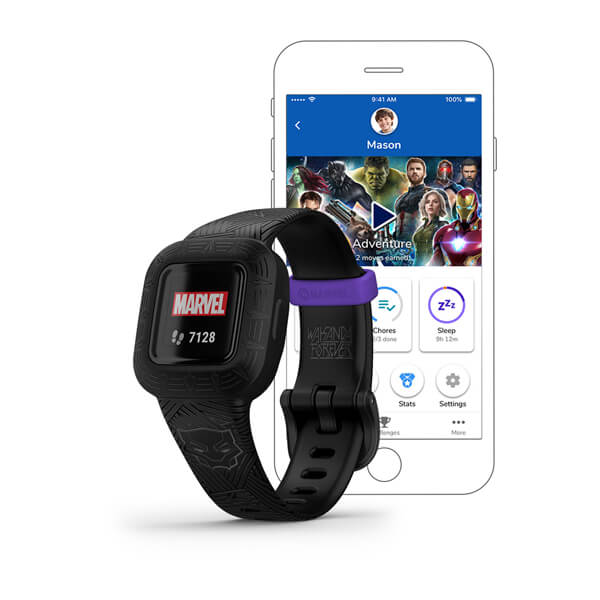
Garmin Vivofit Jr. 3
$89.99· 4/5 rating
Affiliate Disclosure: This article contains affiliate links. If you purchase through our links, we may earn a small commission at no extra cost to you. This helps us keep testing watches and producing honest reviews. We only recommend products we've actually used with our own kids. Read our full disclosure
I get it. I really do. You've been researching kids smartwatches, you found one that looks perfect, and then somewhere in the fine print you spotted it: "$9.99/month cellular plan required." Multiply that by 12 months and suddenly your $100 watch is a $220 commitment. Multiply it by two kids and you're looking at $440 a year just to know where your children are.
I've had more parents email me about this topic than almost any other. "Dave, is there a kids smartwatch that just works out of the box? No plan, no subscription, no recurring charges?" The short answer is yes -- but with an important asterisk that I'm going to be completely upfront about.
Here's the honest truth that I need to put on the table before we go any further: every kids smartwatch that offers real-time GPS tracking and cellular calling requires a monthly plan. Period. There is no workaround, no Wi-Fi-only hack, no one-time payment option that gives you live location tracking and the ability to call your child's wrist. Those features require a cellular connection, and cellular connections cost money every month.
But that doesn't mean your only options are "pay monthly forever" or "give up entirely." There is a whole category of genuinely excellent kids watches and fitness trackers that work perfectly with zero recurring fees. They just do different things than cellular watches -- and for a lot of families, what they do is exactly enough.
This guide covers the best no-fee options I've tested, explains exactly what you gain and lose compared to cellular watches, and helps you figure out which approach actually fits your family. If you want to understand the full landscape of plan costs, our kids smartwatch monthly plans compared guide breaks down every dollar.
Let's dig in.
| Watch | Price | Type | Heart Rate | Water Resistance | Battery Life | Best For |
|---|---|---|---|---|---|---|
| Garmin Vivofit Jr. 3 | $89.99 | Fitness tracker | No | 5 ATM (swim-proof) | Up to 1 year | Best overall no-fee pick |
| BIGGERFIVE Vigor 2 | ~$35 | Fitness tracker | Yes | IP68 | 7-10 days | Best budget option |
| Fitbit Ace 3 | ~$50-80 | Fitness tracker | No | 5 ATM (swim-proof) | Up to 8 days | Best for family ecosystem |
| VTech KidiZoom DX3 | ~$55 | Camera/game watch | No | Splash-proof | 2-3 days | Best for young kids (4-7) |
| Xplora XGO3 | ~$80 | Smartwatch (offline mode) | No | IPX4 | 2-3 days | Best if you might upgrade later |
The bottom line: None of these watches can call you, text you, or show you where your child is in real time. What they can do is track fitness, encourage healthy habits, entertain your kid, and give them the thrill of wearing a "real" watch on their wrist -- all without a single recurring charge.
If I had to recommend exactly one no-monthly-fee watch for kids, this is the one. The Garmin Vivofit Jr. 3 takes Garmin's decades of fitness tracking expertise and packages it into a kid-friendly wristband that does its job remarkably well, and does it for a full year on a single battery.
Yes, you read that right. One year. No charging cable. No nightly routine of reminding your kid to put it on the charger. The Vivofit Jr. 3 uses a replaceable CR2025 coin cell battery that lasts approximately 12 months. When it dies, you swap in a new one for about $3. In a world where I'm charging my own watch every night, this feels like witchcraft.
The fitness tracking is legitimately good. Steps, active minutes, and sleep are all tracked with solid accuracy -- this is Garmin we're talking about, not some off-brand Amazon special. The companion Garmin Jr. app (syncs via Bluetooth to your phone) lets you view your kid's activity data, assign chores and tasks, and set up a virtual currency system where kids earn rewards for hitting goals. Our 7-year-old tester was genuinely motivated by the adventure app games that unlock new content based on daily step goals. He would voluntarily go run around the backyard to "unlock the next level," which is exactly the kind of screen-free motivation I'm after.
The watch is also swim-proof at 5 ATM, which means pool days, beach trips, and unexpected sprinkler ambushes are all covered. It's one of the most durable kids wearables I've tested, and the silicone band is comfortable enough that our tester forgets he's wearing it.
What I Liked:
What I Didn't:
Who It's Best For: Families who want to build healthy activity habits without adding a communication device or monthly bill. Ideal for kids ages 4-10 who are either too young for a cellular watch or whose parents want to start simple before committing to a plan. For more fitness-focused options, see our guide to the best fitness trackers for tweens.
Buy the Garmin Vivofit Jr. 3 on Amazon
At around $35, the BIGGERFIVE Vigor 2 is the cheapest watch on this list, and honestly? It punches well above its weight class. For the price of a couple of happy meals, you get step counting, heart rate monitoring, sleep tracking, and an alarm clock, all with IP68 water resistance and a battery that lasts a week or more.
Let me be clear about what this is: a basic fitness band with a small color screen. It's not trying to be a smartwatch. It doesn't have games, a camera, or GPS. It tracks your kid's activity, shows the time, and buzzes for alarms. That's it. And sometimes "that's it" is exactly what you need.
I put this one on our 9-year-old tester for a month, and she wore it every single day without complaint. She liked checking her step count against another test kid (who was wearing the Garmin Vivofit Jr. 3), and the heart rate feature became a minor obsession -- she'd check it after running, after sitting still, after eating candy, basically using it as her own little science experiment. The sleep tracking gave us some useful data about her actual bedtime versus her "I'm totally asleep" bedtime, which led to a productive conversation with her parents.
The companion app is basic but functional. You can view daily and weekly activity summaries, set step goals, and review sleep patterns. It's not in the same league as Garmin's app, but at one-third the price, I'm not expecting it to be.
What I Liked:
What I Didn't:
Who It's Best For: Families on a tight budget who want a basic fitness tracker without any recurring costs. Also great as a "test run" watch to see if your child will actually wear something on their wrist before you invest in a more expensive device. If you're looking for more options in this price range, our best budget smartwatches under $100 guide has additional picks.
Buy the BIGGERFIVE Vigor 2 on Amazon
The Fitbit Ace 3 holds a special place in the no-fee category because it plugs into the broader Fitbit ecosystem. If you or your partner already wear a Fitbit, the Ace 3 lets your kid join family step challenges, compete on leaderboards, and see their stats alongside yours in the Fitbit app. That social element makes a real difference in keeping kids engaged beyond the first two weeks.
The hardware is solid Fitbit quality -- a slim, swim-proof band with a small but clear OLED display. It tracks steps, active minutes, and sleep. The animated clock faces are a nice touch for younger kids (there's a character that gets more active as your kid moves more throughout the day), and the battery reliably lasts about 8 days between charges.
There's no heart rate monitor on the Ace 3, which is a notable omission since even the $35 BIGGERFIVE includes one. Fitbit clearly reserved that for their higher-end models. But the step and sleep tracking accuracy is excellent -- better than the BIGGERFIVE and on par with the Garmin in my testing.
The pricing on the Ace 3 fluctuates quite a bit. I've seen it as low as $50 on sale and as high as $80 at full retail. At $50, it's a fantastic deal. At $80, you're getting close to Garmin Vivofit Jr. 3 territory and need to weigh which ecosystem and feature set matters more to your family.
What I Liked:
What I Didn't:
Who It's Best For: Families already in the Fitbit ecosystem who want their kids to participate in family fitness challenges. The social competition aspect is the Ace 3's killer feature -- if nobody else in your house wears a Fitbit, some of that value disappears.
Buy the Fitbit Ace 3 on Amazon
The VTech KidiZoom DX3 is a completely different animal from the fitness trackers above. This is an entertainment-first watch with dual cameras (one forward-facing, one selfie), built-in games, a motion sensor for active play games, video recording, photo effects, and customizable watch faces. It's basically a tiny toy computer that happens to strap to your kid's wrist.
There is zero connectivity on this watch. No Bluetooth, no Wi-Fi, no cellular. It cannot connect to the internet in any way. For some parents, that's a bug. For others -- especially parents of 4 to 7-year-olds -- that's an enormous feature. You don't have to worry about screen-time apps, privacy settings, data collection, or your kindergartner accidentally video calling your boss. It's a self-contained device that does exactly what it does and nothing more.
A 6-year-old in our extended test group got one for her birthday and it was the hit of the party. She spent the entire afternoon taking blurry photos of the dog, recording "news reports" about what everyone was eating, and playing the built-in games. The camera quality is exactly what you'd expect from a $55 kids toy -- think early-2000s flip phone -- but kids genuinely don't care. She thought every photo was a masterpiece.
The DX3 is also reasonably durable. VTech knows their audience (young kids who are not gentle with their possessions) and built this watch with a chunky, rubberized case that absorbs impact well. It's splash-resistant but not waterproof -- take it off before the bath or pool.
What I Liked:
What I Didn't:
Who It's Best For: Young kids (ages 4-7) who want a "smartwatch like a big kid" but whose parents aren't ready for connectivity features. It's a fun, self-contained entertainment device that costs $55 once and zero forever after. Think of it as training wheels for wearable tech. For a deep dive into everything this watch does well (and where it falls short), read our full VTech KidiZoom DX3 review.
Buy the VTech KidiZoom DX3 on Amazon
The Xplora XGO3 is a bit of an outlier on this list. It's designed and marketed as a cellular kids smartwatch with GPS tracking and calling. But here's the interesting thing: if you don't activate a SIM card, the XGO3 still functions as a basic watch with a step counter. It won't track GPS, it won't make calls, and it won't send SOS alerts -- but it will tell time and count steps.
Why would you want this? Because the XGO3 gives you an upgrade path. You can start using it as a fee-free step counter and clock, and then later, when your family decides the time is right, pop in a SIM card and activate a plan to unlock the full cellular features. It's the only watch on this list that bridges the gap between "no monthly fee" and "full GPS smartwatch."
I should be honest about the trade-off here: without a SIM, you're paying $80 for what is essentially a $35 fitness tracker experience. The XGO3 without cellular service doesn't have Bluetooth syncing to a parent app, doesn't have chore management, and doesn't have the adventure games that make the Garmin Vivofit Jr. 3 so compelling. You're paying a premium for the option to activate it later.
That said, if you're reasonably confident you'll want GPS and calling within the next 6-12 months, buying the XGO3 now and activating it later can make sense financially. You avoid buying a $35 tracker now and a $80 smartwatch later.
What I Liked:
What I Didn't:
Who It's Best For: Parents who are on the fence about cellular and want to buy once. Start without a plan, see if your kid actually wears it, and activate when you're ready. It's a pragmatic choice, not an exciting one.
This is the section I think matters most in this entire article. I want to lay out exactly what you gain and what you lose by going the no-monthly-fee route, because these are fundamentally different products that serve fundamentally different needs.
If your primary reason for buying a kids watch is safety and communication -- knowing where your child is and being able to reach them -- a no-fee watch will not meet your needs. Full stop. There is no amount of clever shopping that gets around the physics of cellular communication. You need a plan, and the cheapest reliable options are around $10 per month. Our best GPS smartwatches for kids guide covers the best cellular options.
If your primary reason is fitness motivation, building watch-wearing habits, or giving a young child their first wearable -- a no-fee watch is not just adequate, it's often the better choice. You save hundreds of dollars over time, avoid unnecessary complexity, and give your kid exactly what they need without features they're not ready for.
Many families I talk to follow a natural progression: start with a no-fee fitness tracker at ages 4-6, upgrade to a cellular GPS watch at ages 7-9 when the child starts gaining independence, and eventually transition to a phone at ages 11-13. Each stage has the right tool for the right moment.
For parents reading this article who are leaning toward "actually, I do need GPS and calling" -- I want to quickly mention the most affordable monthly plan options so you can make an informed choice.
| Watch | Device Cost | Monthly Plan | Annual Cost |
|---|---|---|---|
| TickTalk 5 | $159.99 | $9.99/mo | ~$280/year total |
| Garmin Bounce 2 | $299.99 | $9.99/mo or $99.99/year | ~$400/year total |
| Cosmo JrTrack 2 | ~$100 | $9.99/mo | ~$220/year total |
| Xplora XGO3 (activated) | ~$80 | $8-10/mo | ~$200/year total |
The Garmin Bounce 2 deserves special mention here. At $99.99/year for the annual plan option (versus $120/year on monthly billing), it's one of the most cost-effective cellular options available. That works out to about $8.33/month for GPS, calling, and texting on a genuinely excellent watch.
If budget is the main concern driving you toward no-fee watches but you really want GPS and calling, running the numbers on a Garmin Bounce 2 with the annual plan or an Xplora XGO3 with a budget MVNO plan might reveal that the gap isn't as wide as you thought. For a detailed breakdown, see our kids smartwatch monthly plans compared guide.
Let me make this simple.
Want the best overall no-fee experience? Get the Garmin Vivofit Jr. 3. The year-long battery life, Garmin-quality tracking, and chore management features make it the standout pick. It's $90 once and nothing ever again.
On a tight budget? Get the BIGGERFIVE Vigor 2. At ~$35, it's cheap enough to be a no-risk purchase, and the heart rate monitoring is a nice bonus you won't find on more expensive trackers.
Already a Fitbit family? Get the Fitbit Ace 3. The family challenge integration is the killer feature here.
Have a young kid (4-7) who just wants a fun watch? Get the VTech KidiZoom DX3. It's a toy, not a tool, and that's perfectly fine for this age group.
Think you might want GPS and calling later? Get the Xplora XGO3. Use it fee-free now, activate it when you're ready.
For a more comprehensive look at all the factors that go into choosing a kids watch, our kids smartwatch buying guide walks through every consideration.
No. As of 2026, every kids smartwatch that offers real-time GPS location tracking requires an active cellular plan to transmit that location data to the parent app. GPS chips can determine a device's location, but without a cellular or data connection, there's no way to send that information to your phone. Some watches use Bluetooth to sync fitness data when you're nearby, but that's not the same as real-time tracking. If GPS is a must-have, budget around $10/month for a cellular plan.
In theory, some watches can report location when connected to known Wi-Fi networks. In practice, this is unreliable and severely limited. Your child would need to be connected to a Wi-Fi network you've pre-configured, which basically means you'd only get location data when they're at home (where you already know they are). Wi-Fi positioning is not a substitute for cellular GPS tracking in any real-world scenario. I've tested it, and it's not worth relying on.
Yes. Fitness trackers use the same basic sensors (accelerometers, gyroscopes, and in some cases optical heart rate monitors) found in smartphones and other consumer electronics. They meet FCC standards for radio emissions -- and no-fee trackers actually emit less radiation than cellular watches since they don't have cellular radios. The Garmin Vivofit Jr. 3 and BIGGERFIVE Vigor 2 both use skin-safe silicone bands. The only precaution I'd suggest is removing the watch occasionally to let the skin underneath breathe, which prevents irritation from moisture buildup.
For most 5-year-olds, a no-fee watch is the right call. At this age, children are almost always with a supervised adult -- at home, at school, at daycare, or with a caregiver. The primary use cases for GPS tracking (walking to school alone, biking around the neighborhood, spending time unsupervised at a park) generally don't apply yet. A Garmin Vivofit Jr. 3 or VTech KidiZoom DX3 gives them the excitement of wearing a watch while saving you $120+ per year in plan costs. You can always upgrade to a cellular watch when they start gaining real independence, usually around ages 7-9.
Absolutely, and this is actually one of their biggest advantages. Since no-fee watches have no cellular connectivity, no messaging capability, and no incoming notifications, they're far less likely to violate school device policies. A fitness tracker is functionally just a watch that counts steps -- most schools have no issue with that. Compare this to cellular smartwatches, which many schools restrict or ban because they can receive calls and messages during class. The VTech KidiZoom DX3 is the one exception to watch for, since its games could be a distraction, but even that has no connectivity for schools to worry about.
The tipping point is independence. When your child starts doing things where you'd otherwise be unable to reach them -- walking or biking to school, going to a friend's house, staying at after-school activities, playing at the park without you -- that's when GPS tracking and calling go from "nice to have" to genuinely valuable. For most families, this transition happens somewhere between ages 7 and 9. Start watching for the moment when you find yourself thinking "I wish I could just check where they are" or "I wish they could call me right now." That's your signal. When you're ready, our best GPS smartwatches for kids guide will help you choose the right cellular watch for the next stage.
Not every family needs a $300-per-year cellular smartwatch on their kid's wrist. For young children, budget-conscious families, or parents who just want to encourage healthy habits without adding another monthly bill, the no-fee watches on this list deliver real value at a one-time cost.
The Garmin Vivofit Jr. 3 is the standout pick: proven fitness tracking, a year-long battery, and the Garmin ecosystem backing it up. At $89.99 with zero recurring fees, it's hard to argue with the value proposition.
Just go in with clear expectations. These watches are fitness trackers and fun wearables, not safety devices. They won't track your child's location or let you call their wrist. If that's what you need, a monthly plan isn't optional -- it's the cost of that capability. And that's okay. The right tool depends on the right moment, and for many families, the no-fee route is the perfect place to start. For the latest prices on both no-fee and cellular watches, visit our deals page.
If you're shopping for a gift, our Easter 2026 kids smartwatch gift guide includes several no-monthly-fee picks that make great presents without committing the recipient to a cellular plan.
Have questions about whether a no-fee watch or a cellular watch is right for your family? Drop a comment below or reach out through our contact page. I personally respond to every question and I'm happy to help you figure out which approach fits your situation.
Looking for the best kids smartwatch for your son? We tested every top option and picked the 7 best for boys based on durability, design, features, and real-world performance.
Sending your kid to summer camp? These GPS smartwatches let you stay connected without sending a phone. We tested the best options for day camp, sleepaway camp, and outdoor adventures.
Looking for the best kids smartwatch for your daughter? We tested every top option and picked the 7 best for girls based on color options, design, features, and real-world performance.
Garmin Bounce 2 vs Bark Watch head-to-head comparison. We break down GPS accuracy, monthly costs, fitness tracking, parental controls, and which watch delivers the best value for your family.
TickTalk 5 vs COSMO JrTrack 5 head-to-head comparison. We break down GPS accuracy, video calling, cameras, music streaming, monthly costs, and which watch is the better buy for your family.
New review alerts, deal drops, and seasonal buying guides — delivered weekly. No spam, unsubscribe anytime.
No spam. Unsubscribe anytime.