Affiliate Disclosure: This article contains affiliate links. If you purchase through our links, we may earn a small commission at no extra cost to you. We only recommend products we have personally tested and believe in. Our opinions are our own and are not influenced by any affiliate partnerships.
Best Smartwatches for 8-Year-Olds in 2026: The Sweet Spot Age for GPS Watches
Eight is the age when everything shifts. Our primary tester for this article turned eight last fall, and within about six weeks he was walking to a friend's house two streets over, staying after school for robotics club, and riding his bike to the park with the neighbor kids. No parent in tow. Just a kid with a growing orbit of independence.
And I sat in the kitchen staring at my phone thinking: I need to know where he is without being the dad who follows him on a bicycle.
Here is the thing about eight-year-olds that makes them the perfect age for a GPS smartwatch. They are old enough to use a device responsibly. They can read, navigate menus, understand the concept of pressing a button in an emergency. They will not put it in a toilet tank. (If you have a five-year-old and that line makes no sense to you, read our smartwatch guide for 5-year-olds for some cautionary tales.) But eight-year-olds are also young enough that they genuinely need GPS tracking. They are not teenagers with the judgment to navigate complex situations alone. They are second and third graders who are starting to explore the world beyond your line of sight for the first time.
That combination, capable enough to use it, young enough to need it, makes age eight the sweet spot. I have tested smartwatches across every age group and I keep coming back to this: if you are going to invest in one GPS watch at one specific moment in your kid's childhood, eight is the moment.
I spent five weeks testing five of the best GPS smartwatches on the market with our 8-year-old tester to find out which ones actually deliver for this age group. Not which ones have the best spec sheets. Which ones an eight-year-old will actually wear, use correctly, and not destroy.
What an 8-Year-Old Needs (and Does Not Need) in a Smartwatch
Before I get into the individual watches, I want to lay out the criteria I used. Eight-year-olds have very specific needs, and they are different from what a five-year-old or a twelve-year-old requires.
What They Need
GPS tracking. This is the whole reason you are here. Your kid is walking to school, going to friends' houses, and participating in after-school activities. You need to see where they are on a map, and you need that location to be accurate. Geofencing, the ability to set up virtual boundaries and get alerts when your child enters or leaves a zone, is also critical at this age.
Two-way calling. An eight-year-old is ready to call you when practice ends early or plans change. They are also old enough to answer a call from you without accidentally hanging up eleven times. Calling to a pre-approved contact list is the right model here: they can reach you, grandma, the babysitter, but not random numbers.
SOS button. One press to call a parent and share their location in an emergency. Non-negotiable. For a deep dive into how SOS and other safety features work across different watches, check our kids smartwatch safety features guide.
School mode. Your child's teacher does not want a buzzing, flashing watch disrupting math class. School mode disables everything except basic time display and the SOS button during set hours. Every watch on this list supports it, and you should enable it on day one.
Durability. Eight-year-olds play hard. Recess involves running, climbing, sliding, and occasionally crashing into things at full speed. The watch needs to survive all of that plus rain, sweat, hand-washing, and the occasional drop onto concrete.
What They Do Not Need
Social media. Not at eight. Not a chance. No watch on this list provides access to social networks, and that is intentional.
A web browser. Eight-year-olds do not need unsupervised internet access on their wrist. Or anywhere else, honestly.
App stores. The watch should come with the features it needs out of the box. Your child should not be downloading random apps onto a safety device.
Games (or at least, not many). This is the line where reasonable parents disagree. I personally prefer watches with minimal or no games. Some watches on this list include a few simple games, and as long as you can disable them during school hours, that is acceptable. But if the watch is primarily a gaming device that happens to have GPS, it has missed the point.
If you are still weighing whether a smartwatch or a phone is the right call for your eight-year-old, our smartwatch vs. phone comparison walks through that decision in detail. The short answer for most eight-year-olds: the watch wins.
Quick Comparison: Top 5 Smartwatches for 8-Year-Olds
| Feature |
Xplora X6Play |
Garmin Bounce |
Cosmo JrTrack 2 |
TickTalk 4 |
Gabb Watch 3 |
| Price |
~$150 |
~$150 |
~$100 |
~$180 |
~$100 |
| Best For |
Overall pick for age 8 |
Active/sporty kids |
Value-conscious families |
Staying connected |
No-frills safety |
| GPS Accuracy |
Very Good (5-8m) |
Excellent (3-6m) |
Good (8-12m) |
Good (6-10m) |
Very Good (5-8m) |
| Calling |
4G voice calls |
Voice + messaging |
4G voice calls |
4G voice + video |
Voice calls |
| Video Calling |
No |
No |
No |
Yes |
No |
| Camera |
Yes |
No |
Yes |
Yes (front + rear) |
No |
| Water Resistance |
IP68 |
5 ATM (swim-proof) |
IP67 |
IPX7 |
IP67 |
| Battery Life |
2-3 days |
2-3 days |
1.5-2 days |
1.5-2 days |
2-3 days |
| Monthly Plan |
~$10/month |
~$10/month |
~$10/month |
~$10/month |
~$10/month |
| Fitness Tracking |
Step counter |
Full activity tracking |
Step counter |
Step counter |
Step counter |
| Our Rating |
9.1/10 |
9.0/10 |
8.5/10 |
8.8/10 |
8.6/10 |
Detailed Reviews
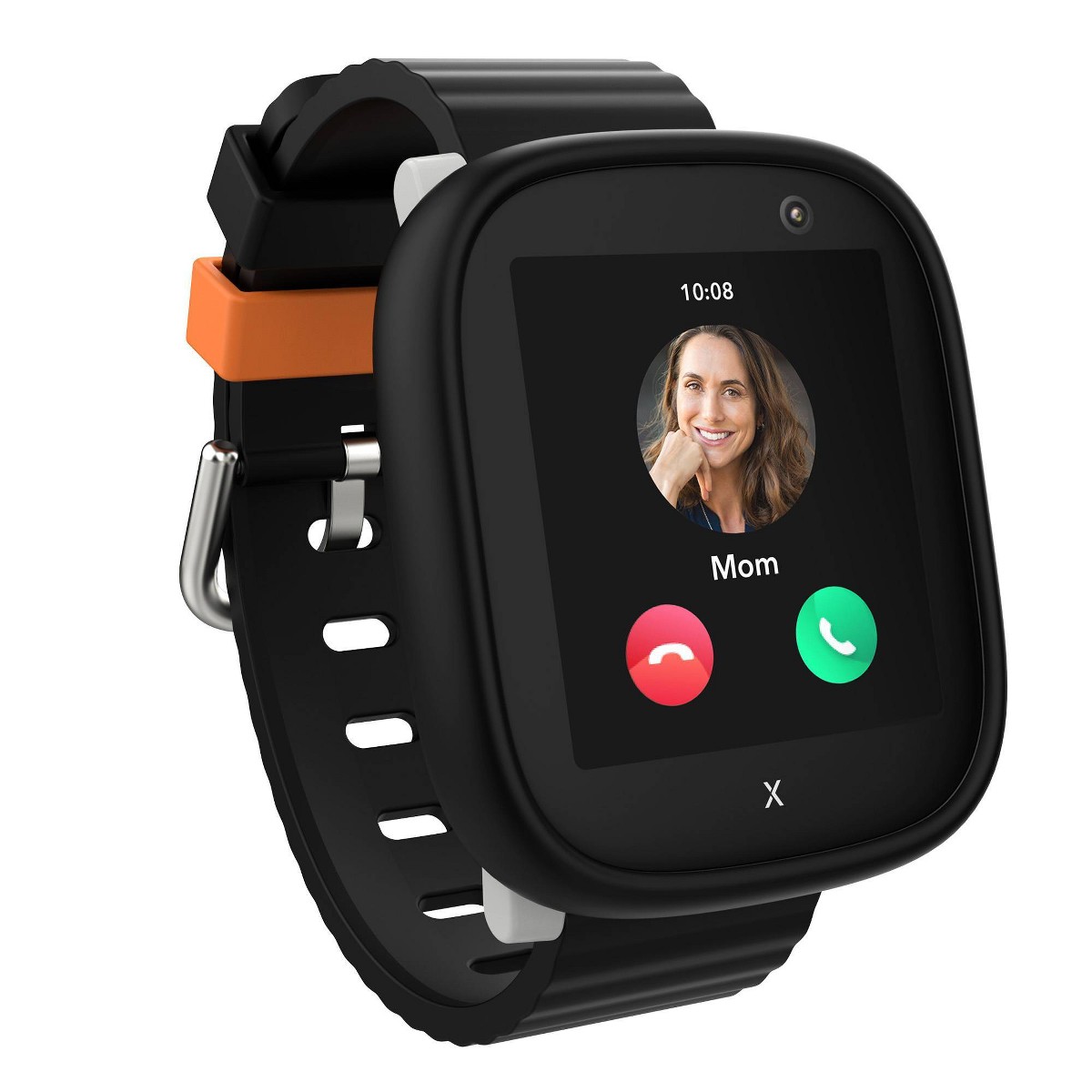
1. Xplora X6Play (~$150) — Best Overall for 8-Year-Olds
Check price on Amazon
The Xplora X6Play is the watch our tester wore the most, and the one he asked for on mornings when I tried to rotate a different watch onto his wrist. That is not scientific data, but it tells you something important about how an eight-year-old experiences this product.
The X6Play hits every requirement for this age group without overreaching. It provides 4G calling to a pre-approved contact list, reliable GPS tracking, an SOS button, school mode, and a camera. The interface is clean and intuitive. Our tester was fully comfortable navigating it within the first afternoon, which is a significant upgrade from younger kids who need days of practice. Eight-year-olds are fast learners with touchscreens because they have grown up watching us use them.
GPS accuracy was consistently in the 5 to 8 meter range outdoors. During the school day, it showed our tester inside the correct building. When he walked to a friend's house, I could watch his progress on the map in the Xplora app, and the location matched the route I knew he was taking. The geofencing worked reliably. I set up a zone around our house and the school, and I received notifications within about 30 seconds of him entering or leaving those areas.
The camera was a hit. Eight-year-olds are old enough to take intentional photos rather than 400 pictures of the ceiling, so our tester actually used it to show me things: the robot he built at robotics club, a weird bug he found at the park, his lunch. The photos are not going to win any awards, but they are functional and they give the watch a fun dimension beyond pure safety.
School mode was straightforward to configure. I set it for 8:00 AM to 3:15 PM on weekdays, and during those hours the watch only displays the time and allows SOS. No calls, no camera, no notifications. His teacher never had an issue with it.
The build quality feels solid. The IP68 water resistance handled rain, hand-washing, and an accidental dunk in a puddle during recess without any issues. Battery life was two to three days with moderate use, meaning we charged it every other night as part of the bedtime routine.
If you want a deeper look at how the X6Play stacks up against the Garmin Bounce specifically, we have a full head-to-head comparison that breaks it down feature by feature.
Pros:
- 4G calling with pre-approved contacts only
- GPS accuracy is strong and consistent
- Camera adds fun without being a distraction
- School mode is easy to set and reliable
- SOS button connected within 10-15 seconds every time
- IP68 water resistance handles real-world kid abuse
- Interface is intuitive for eight-year-olds
Cons:
- Monthly cellular plan adds ongoing cost (~$10/month)
- Camera quality is basic (fine for an eight-year-old, do not compare it to a phone)
- No fitness tracking beyond a step counter
- Slightly bulky on smaller-wristed eight-year-olds
Can an 8-year-old operate it independently? Absolutely. Our tester was fully independent with it after one afternoon. Calling, SOS, camera, messaging — he handled all of it without asking for help.
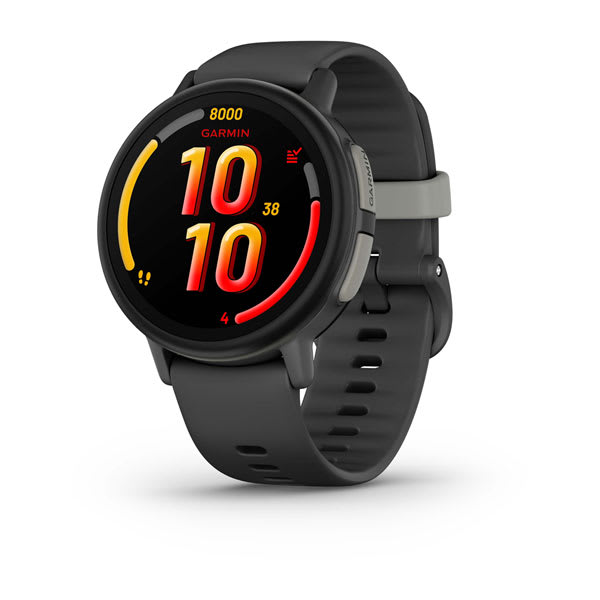
2. Garmin Bounce (~$150) — Best for Active 8-Year-Olds
Check price on Amazon
If your eight-year-old is the kid who comes home with grass stains on their knees every single day, the Garmin Bounce was built for them. This is the most rugged and fitness-oriented watch on this list, and it comes from a company that has been making bulletproof GPS devices for decades.
The Garmin Bounce includes GPS tracking, LTE messaging to pre-approved contacts, voice calling, an SOS feature, and Garmin's activity tracking ecosystem. That last part is what sets it apart. This watch tracks steps, active minutes, and movement throughout the day, and it ties into the Garmin Jr. app where kids can earn badges and compete in family step challenges. Our tester has a competitive streak, and the step challenges against a parent kept him motivated for weeks. (He won on most days, which is both impressive and slightly embarrassing for the adult.)
GPS accuracy was the best of any watch on this list, consistently in the 3 to 6 meter range outdoors. Garmin's GPS heritage shows here. Location updates were frequent and reliable, and the geofencing notifications came through quickly. When our tester was at the park four blocks away, I could see roughly where on the playground he was. That level of precision gave me genuine peace of mind.
The standout hardware feature is the 5 ATM water resistance rating, which means this watch is swim-proof. Not splash-proof, not "it can handle rain" proof. Swim-proof. Our tester wore it to swim practice, jumped in the pool, did cannonballs, and wore it in the shower afterward. The watch did not care. If your eight-year-old is a swimmer or you simply do not want to worry about water damage, this is the only watch on this list that offers true swim-proof protection. We cover water resistance ratings in detail in our best waterproof smartwatches roundup.
The interface is clean and Garmin-functional. It is not as colorful or flashy as the Xplora, which might matter to some kids. Our tester described it as "kinda plain but cool," which I think is accurate. It looks more like a real sports watch and less like a toy, which some eight-year-olds will prefer.
One notable difference: the Garmin Bounce does not have a camera. This did not bother our tester, but it might bother your kid. It also uses messaging rather than traditional phone-style calling for most communication, though voice calls are supported through the LTE connection.
Battery life was two to three days, which matched the Xplora. Charging was easy with Garmin's proprietary cable.
Pros:
- Best GPS accuracy on this list (3-6 meters)
- 5 ATM swim-proof — the only truly waterproof option here
- Full activity tracking with step challenges and badges
- Garmin's GPS reliability and heritage
- Durable build designed for active kids
- LTE messaging and voice calling
- Looks like a "real" watch, not a toy
Cons:
- No camera
- Interface is more functional than fun
- Garmin's proprietary charger is easy to lose
- Monthly plan required (~$10/month)
- Messaging interface has a slight learning curve
Can an 8-year-old operate it independently? Yes. The messaging took our tester a little longer to master than straightforward calling on other watches, maybe a day or two of practice. But he got comfortable quickly, and the fitness features he understood immediately.
3. Cosmo JrTrack 2 (~$100) — Best Value for 8-Year-Olds
Check price on Amazon
If you are not ready to spend $150 or more on a device that might get smashed during a game of playground tag, the Cosmo JrTrack 2 delivers the core features at a significantly lower price point. And here is the thing: for most eight-year-olds, the core features are enough.
The JrTrack 2 includes 4G calling to pre-approved contacts, GPS tracking, an SOS button, geofencing, a camera, and school mode. It covers the same essential checklist as the Xplora X6Play, and for roughly $50 less upfront. The monthly plan runs about $10 per month, comparable to the other cellular watches on this list. For a full roundup of affordable options, our best budget smartwatches under $100 guide has additional picks.
GPS accuracy was good but not great, typically in the 8 to 12 meter range outdoors. That means I could tell which block the tester was on, but not always which side of the street. For practical purposes, this was accurate enough. I always knew he was at the school, at the park, or at a friend's house. But compared to the Garmin Bounce or Xplora X6Play, the location dot wandered a little more.
The interface is colorful and kid-friendly with large, clear icons. Eight-year-olds navigate it easily. The SOS function, a long press on the side button, worked reliably in every test. The camera is basic, on par with the Xplora's in terms of quality.
Where the JrTrack 2 falls short is in build quality and battery life. The watch feels slightly more plastic-y than the Xplora or Garmin, and the battery consistently needed a charge by the end of day two. On heavy-use days where the tester was calling and using the camera a lot, it sometimes dipped to low battery by late afternoon on day one. That is cutting it close if you are relying on GPS tracking after school.
The companion app for parents is solid. Location tracking, contact management, geofencing, school mode scheduling, and feature controls are all there. It is not quite as polished as Garmin's or Xplora's apps, but it gets the job done.
Pros:
- $50 less than comparable watches at the ~$100 price point
- 4G calling, GPS, SOS, camera, and school mode are all included
- Colorful, intuitive interface kids pick up quickly
- Affordable monthly plan (~$10/month)
- Good parent app with solid remote controls
- Geofencing and location history work well
Cons:
- GPS accuracy is a step behind the premium options
- Battery life is the shortest on this list at 1.5-2 days
- Build quality feels less premium
- IP67 water resistance handles splashes but not submersion
- Some minor game features that should be disabled
Can an 8-year-old operate it independently? Yes. Our tester had it figured out within a couple of hours. The interface is straightforward, and at eight, kids can read the on-screen text without needing photo-based contacts.
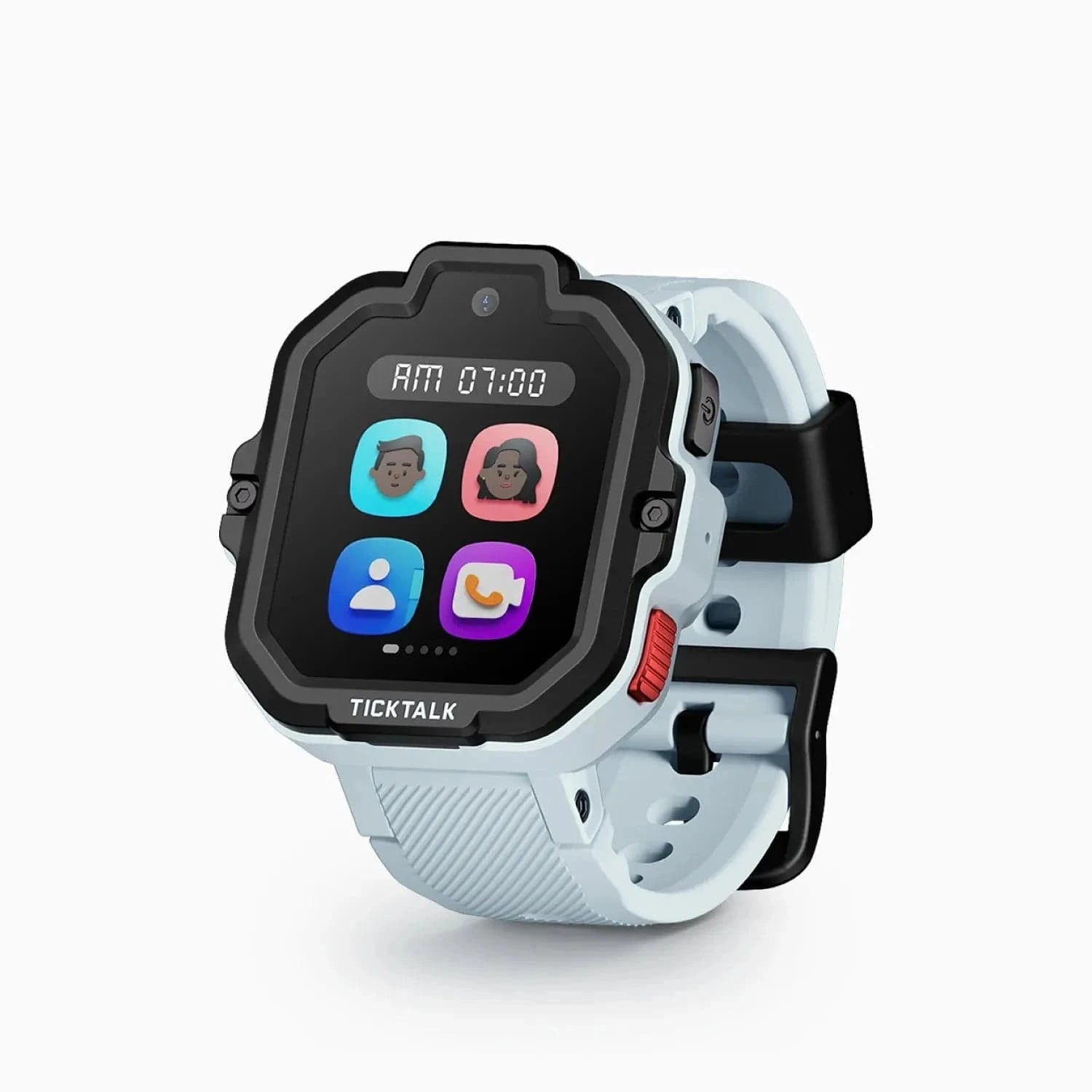
4. TickTalk 4 (~$180) — Best for Staying Connected
Check price on Amazon
The TickTalk 4 is the most communication-focused watch on this list, and its headline feature is video calling. If your eight-year-old is the kid who calls you from the other room just to say hi, this watch will make their day.
Video calling on a watch is exactly as charming and slightly awkward as you would expect. The front-facing camera captures your kid's face (usually off-center and slightly up-the-nose, because eight-year-olds do not think about camera angles), and they can see you on the small screen. The call quality over 4G is decent but not perfect. In strong signal areas, video was smooth. In weaker coverage, it occasionally froze or dropped to audio-only. But when it worked, it was genuinely delightful. Our tester called from the park just to show me the fort he was building, and that two-minute video call was worth the price of the watch.
Beyond video calling, the TickTalk 4 supports standard voice calls, voice messages, text messages to pre-approved contacts, GPS tracking, SOS, and school mode. It also has both a front and rear camera, so kids can take selfies or regular photos. For a more detailed look at everything this watch does, read our full TickTalk 4 review.
GPS accuracy was good, in the 6 to 10 meter range. Not the tightest on this list, but sufficient for knowing your child's general location. The companion app is well designed, and the setup process was one of the smoother experiences in our testing.
The trade-offs are price and battery life. At roughly $180, the TickTalk 4 is the most expensive watch on this list. And the video calling feature, even when used sparingly, hits the battery harder than voice-only watches. I consistently got about 1.5 to 2 days of battery life, and on days when the tester made several video calls, it sometimes needed a mid-afternoon charge. That is a real concern if battery reliability matters to you.
The watch itself is well-built with a comfortable silicone band. IPX7 water resistance means it handles splashes and rain, but you should take it off before swimming.
Pros:
- Video calling is a genuine standout feature
- Front and rear cameras for selfies and regular photos
- 4G voice calling, messaging, and voice messages
- Good parent app with straightforward setup
- GPS tracking with geofencing
- SOS button works reliably
- School mode to prevent classroom distractions
Cons:
- Most expensive watch on this list at ~$180
- Battery life suffers with video calling use (1.5-2 days)
- Video call quality depends heavily on signal strength
- IPX7 water resistance is not swim-proof
- Monthly plan required (~$10/month)
Can an 8-year-old operate it independently? Yes, and they will love it. Our tester figured out video calling on the first attempt because the concept is completely intuitive for kids who have grown up with FaceTime. Voice calls, messaging, and SOS were all easy for him.
5. Gabb Watch 3 (~$100) — Best for No-Frills Safety
Check price on Amazon
The Gabb Watch 3 is the watch for parents who want GPS and calling and nothing else. No camera, no games, no fun extras. Just a safety device on your kid's wrist. And there is a strong argument that this is exactly the right approach for many families.
Gabb has built its brand around the concept of giving kids connectivity without the noise, and the Watch 3 delivers on that promise. The interface is clean and minimal. The home screen shows the time. Swipe to see contacts. Tap to call. Hold the side button for SOS. That is essentially the entire user experience. There is no camera to fiddle with during class, no games to sneak during homework, no photo library filling up with 300 blurry pictures of the ceiling fan.
For an eight-year-old, the Gabb Watch 3 eliminates every potential distraction and leaves only the features that matter for safety and communication. Some kids will find this boring. Our tester was not thrilled with it compared to the Xplora or TickTalk. But from a parent's perspective, there is something deeply appealing about a device that does three things (track, call, SOS) and does them well.
GPS accuracy was very good at 5 to 8 meters outdoors, matching the Xplora X6Play. Battery life was a strong 2 to 3 days, partly because there are fewer features draining the battery. The SOS button worked every time in testing. The monthly plan is about $10 per month.
The watch fits eight-year-old wrists well. The band is comfortable, the screen is easy to read, and the overall build quality is solid without being bulky.
One thing I appreciate about Gabb's approach: because the watch has so few features, there is almost nothing for parents to configure. You set up contacts, enable school mode, and you are done. No decisions about which games to disable, which apps to restrict, which features to turn off. It is refreshing.
Pros:
- Zero distractions: no games, no camera, no apps
- Clean, minimal interface that is impossible to misuse
- Reliable GPS tracking with good accuracy (5-8m)
- 2-3 day battery life
- SOS button is fast and reliable
- Simple setup with minimal configuration needed
- Affordable at ~$100
Cons:
- No camera (some kids will miss this)
- No fitness tracking beyond basic step counting
- Minimalist approach may feel boring to some eight-year-olds
- Limited color and band options
- Monthly plan required (~$10/month)
- No messaging, only voice calls
Can an 8-year-old operate it independently? Immediately. There is almost nothing to learn. Our tester was making calls and understood SOS within the first five minutes. The simplicity that makes some kids find it boring is the same simplicity that makes it effortless to use.
What 8-Year-Olds Actually Think
I can tell you about GPS accuracy and battery life all day, but none of that matters if your kid refuses to wear the thing. Here is what our primary tester and two of his friends (who tested watches with their parents' permission during playdates) actually thought about these devices.
The watch they fought over: The TickTalk 4. Video calling is an absolute magnet for eight-year-olds. Every kid wanted to try it, and they all thought it was the coolest feature on any watch. One of the other kids asked his mom for one the same day he tried it.
The watch they wore without thinking about it: The Garmin Bounce. It looked the most like a "real" watch, and for eight-year-olds who are starting to develop a sense of what looks cool, that mattered. Our tester wore it to a birthday party and a couple of the other kids thought it was just a regular sports watch, which he considered a compliment.
The feature they used most: Calling. By a wide margin. Eight-year-olds are social creatures, and the ability to call Mom or Dad whenever they wanted was the primary value proposition from their perspective. "Hey Dad, can my friend stay for dinner?" was the kind of call I got four times a week.
The feature they ignored: Step counting. None of the kids cared about their step count unless there was a direct challenge or competition attached to it. The Garmin Bounce's step challenges were the exception because our tester wanted to beat the adults.
The feature they wished every watch had: A camera. The two watches without cameras (Garmin Bounce and Gabb Watch 3) got consistent complaints from the kids. Eight-year-olds want to take pictures of things and show them to people. It is how they share their world. If your eight-year-old cares about color and design as much as features, our best kids smartwatches for girls in 2026 guide covers the top picks ranked by style and aesthetics.
The one they forgot they were wearing (in a good way): The Gabb Watch 3. It was so unobtrusive and distraction-free that our tester would go entire afternoons without touching it. As a parent, that is actually what I want. As a kid, he found it less exciting.
Setting Up Parental Controls for an 8-Year-Old
Eight is an age of transitions, and the way you set up a smartwatch should reflect that. You are not locking it down the way you would for a five-year-old, but you are also not handing over full autonomy. Here is how I approached it.
Every watch on this list lets you pre-approve contacts. I started the tester with six contacts: both parents, both grandparents, the neighbor who watches him after school sometimes, and his best friend's mom. That covered every scenario where he might need to reach someone. I told him clearly: "You can call anyone on this list anytime. These are the only people the watch will call." He understood immediately.
Set School Mode on Day One
Do not wait for the teacher to email you. Set school mode before the first school day. I configured it for 7:45 AM to 3:20 PM on weekdays, with a few extra minutes as buffer on both ends. During school mode, only the time display and SOS button are active. No calls, no camera, no notifications.
Establish a Geofence for Home and School
Every watch on this list supports geofencing. I set up three zones: home (200-meter radius), school (150-meter radius), and the best friend's house (100-meter radius, because that is where our tester goes most often). I receive a notification when he arrives and when he leaves each zone. This is the single most useful feature for day-to-day peace of mind. You do not need to obsessively check the map when you know you will get an alert if something unexpected happens.
Give Them Some Space
Here is the part a lot of parenting blogs skip. An eight-year-old needs some breathing room. I check the tester's location when he is supposed to be at a specific place and I want to confirm he arrived safely. I do not sit there watching the blue dot move in real time for thirty minutes while he plays at the park. He is eight. He deserves to play without his dad surveillance-tracking his every move. The watch is a safety net, not a leash.
If you want to set appropriate guardrails, resist the urge to check the live map every five minutes. Trust the geofence alerts. They will tell you what you need to know.
Revisit Settings Every Few Months
As a kid's world expands, the watch settings should expand with it. When he started biking to the park on his own, I added a geofence for the park. When he started hanging out at another friend's house, I added that contact and that location. The watch should grow with your kid's independence, not restrict it.
Frequently Asked Questions
Is 8 years old the right age for a GPS smartwatch?
In my experience, eight is the ideal starting age for a full GPS smartwatch with calling and SOS features. Most eight-year-olds can operate the watch independently, understand when and how to use SOS, and are beginning the kind of independent activities (walking to school, playing at the park, going to friends' houses) where GPS tracking provides real value. Some children are ready earlier, and we have a guide for those families covering watches for 5-year-olds. But eight is the age where the technology and the child's development align most naturally.
Do all of these watches require a monthly plan?
Yes. Every watch on this list requires a monthly cellular plan, typically around $10 per month, to enable GPS tracking, calling, and SOS functionality. These watches use 4G LTE to transmit location data and make calls, which requires a cellular connection. The monthly cost is a real factor in the total cost of ownership. Over a year, a $100 watch with a $10/month plan costs $220 total. Budget accordingly.
Which watch has the best battery life?
The Xplora X6Play, Garmin Bounce, and Gabb Watch 3 all delivered 2 to 3 days of battery life in my testing, which was the best in this group. The Cosmo JrTrack 2 and TickTalk 4 both came in at 1.5 to 2 days. For any watch, heavy use of calling and camera features will drain the battery faster. I recommend making nightly charging part of the bedtime routine regardless of which watch you choose. It is easier to build the habit than to manage partial charges.
Can a child's teacher see or hear what is happening through the watch?
No. These watches do not have a remote listening or monitoring feature that works during school mode. When school mode is active, the watch is essentially a digital clock with an emergency button. Teachers generally accept GPS watches as long as school mode is enabled and the watch does not ring, buzz, or light up during class. That said, always check your school's specific policy on wearable devices before sending your child in with a new watch.
The watches on this list all use a closed contact system, meaning your child can only communicate with contacts you pre-approve through the parent app. A stranger cannot call or message your child's watch. GPS location data is transmitted between the watch and the companion app on your phone, and reputable brands use encryption for this data. No system is perfectly hack-proof, but the closed-contact model is a strong first layer of protection. Our safety features guide covers this topic in more depth.
Should I get a smartwatch or a phone for my 8-year-old?
For most eight-year-olds, I recommend a smartwatch over a phone. A smartwatch provides GPS tracking, calling, and SOS without the distractions of a full smartphone: no social media, no web browsing, no app store, no YouTube. A watch also stays on the wrist, which means it is harder to lose, leave in a backpack, or forget at a friend's house. Most child development experts suggest delaying smartphones until at least middle school. A GPS smartwatch gives your child the communication and safety tools they need without opening Pandora's box.
How accurate is the GPS tracking on these watches?
GPS accuracy varied across the watches I tested. The Garmin Bounce was the most accurate at 3 to 6 meters outdoors, which means I could tell roughly where on a playground a child was. The Xplora X6Play and Gabb Watch 3 were very good at 5 to 8 meters. The TickTalk 4 and Cosmo JrTrack 2 were good at 6 to 12 meters. Indoor accuracy drops for all devices because GPS signals weaken inside buildings. Watches that supplement GPS with Wi-Fi positioning generally perform better indoors. For a broader look at GPS performance, our best GPS smartwatches roundup covers accuracy testing across more devices.
What if a child loses the watch?
Because these watches have GPS tracking, you can use the companion app to see the watch's last known location, which is a significant advantage over losing a phone that might not have tracking enabled. Most watches also support a "find my watch" feature that makes the watch ring loudly even if it is on silent mode. In practice, watches are harder to lose than phones because they are strapped to the wrist. In five weeks of testing, our tester never lost a watch. He did once leave one at a friend's house, and I found it using the GPS within about ten seconds.
Which watch do you recommend for most 8-year-olds?
For the majority of families, the Xplora X6Play is my top pick. It hits the sweet spot of GPS accuracy, calling, SOS, camera, and school mode at a reasonable price point. It is the watch our tester reached for most often, and it is the one that gave me the most consistent peace of mind.
If your kid is athletic and you need a swim-proof option, the Garmin Bounce is the clear choice. If budget is the priority, the Cosmo JrTrack 2 delivers the essentials for $50 less. And if video calling sounds like it would make your child's day, the TickTalk 4 is worth the premium.
Final Thoughts
Eight years old is the age where a smartwatch stops being a novelty and starts being a genuinely useful tool for both kids and parents. Your child is stepping into the world with increasing independence, and a GPS watch gives them the freedom to explore while giving you the peace of mind to let them.
I have tested watches across every age group, and the difference between buying a watch for a five-year-old and buying one for an eight-year-old is night and day. At eight, the watches work the way they are supposed to. Kids use them correctly. The GPS matters because kids are actually going places on their own. The calling matters because kids are old enough to communicate clearly. The SOS matters because, while you hope they never need it, you know they would be able to use it. Looking for a younger child? See our best smartwatches for 7-year-olds guide. For a slightly older child, check our best smartwatches for 9-year-olds guide.
Pick the watch that fits your child's personality and your family's priorities. Set it up thoughtfully. Give your kid some space to grow into it. And then enjoy the fact that you can let them ride their bike to the park without driving yourself slowly insane wondering if they are okay.
They are okay. And now you can confirm it with a quick glance at your phone.
Looking for the best price? Our deals page tracks current discounts on all the watches in this guide.